
If data centers were action movies, hot and cold aisle containment would be the unsung heroes, saving the day without getting the glory. While everyone obsesses over processors, memory, and storage capacities, the magic often happens in those carefully engineered air corridors.
Your cutting-edge server farm is a room full of expensive electric heaters without proper cooling. As someone who has felt the wall of heat blasting from an unoptimized server room (and may have used one to reheat pizza once or twice), I can tell you that airflow management isn't just nice to have—it's mission-critical.
The Tale of Two Aisles
Imagine your data center as a thermal battlefield. The cold air army stands on one side, ready to cool your precious equipment. On the other hand, the hot exhaust air rebels, determined to mix in and cause chaos. Without containment systems, these two forces clash in an inefficient thermal mess that wastes energy and threatens equipment.
Hot/cold aisle containment is essentially building fortified boundaries in this battle, separating the armies so each can do its job effectively. And like choosing between Marvel and DC, you must pick a side: Hot Aisle Containment (HAC) or Cold Aisle Containment (CAC).
Hot Aisle Containment: The Heavyweight Champion
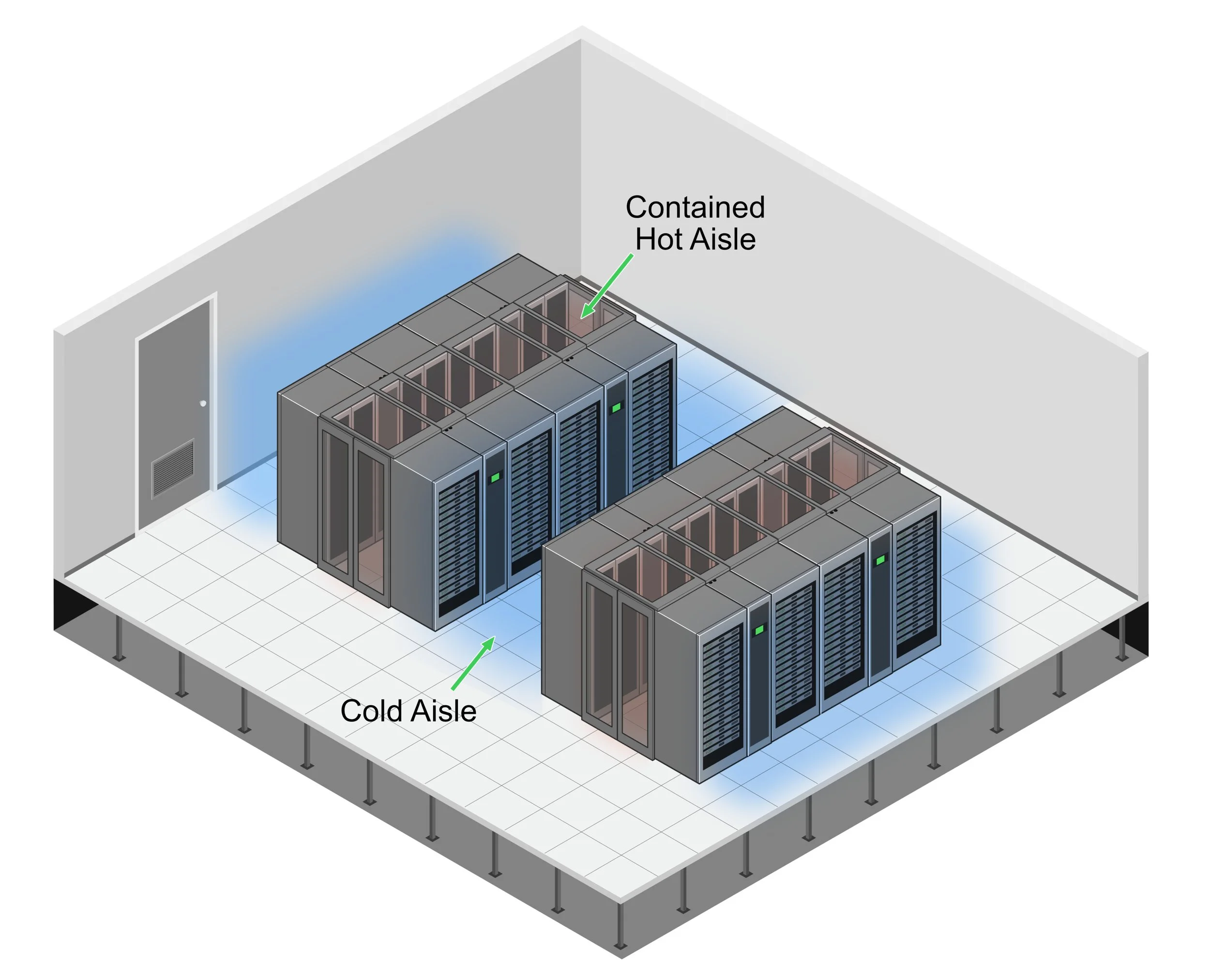
Hot aisle containment works like your kitchen range hood—capturing heat at its source and channeling it away. By enclosing the hot aisles (where server exhaust exits), HAC systems contain that blast furnace of heated air and guide it straight back to cooling units, without letting it mix with the cold supply air.
Why HAC Rocks:
-
Creates a comfortable workspace temperature (unlike the alternative, which essentially turns your data center into a sauna with expensive computers)
-
Delivers superior efficiency for high-density racks (we're talking 15kW+ per rack—the Ferraris of server configurations)
-
Provides better cooling efficiency and failure resilience (giving you precious extra minutes to avoid meltdown scenarios if cooling fails)
The physical setup includes sealed doors at aisle ends, roof systems above the hot aisle, and vertical barriers to complete the containment. Think of it as building a greenhouse for the heat you want to capture rather than generate.
Cold Aisle Containment: The Nimble Challenger
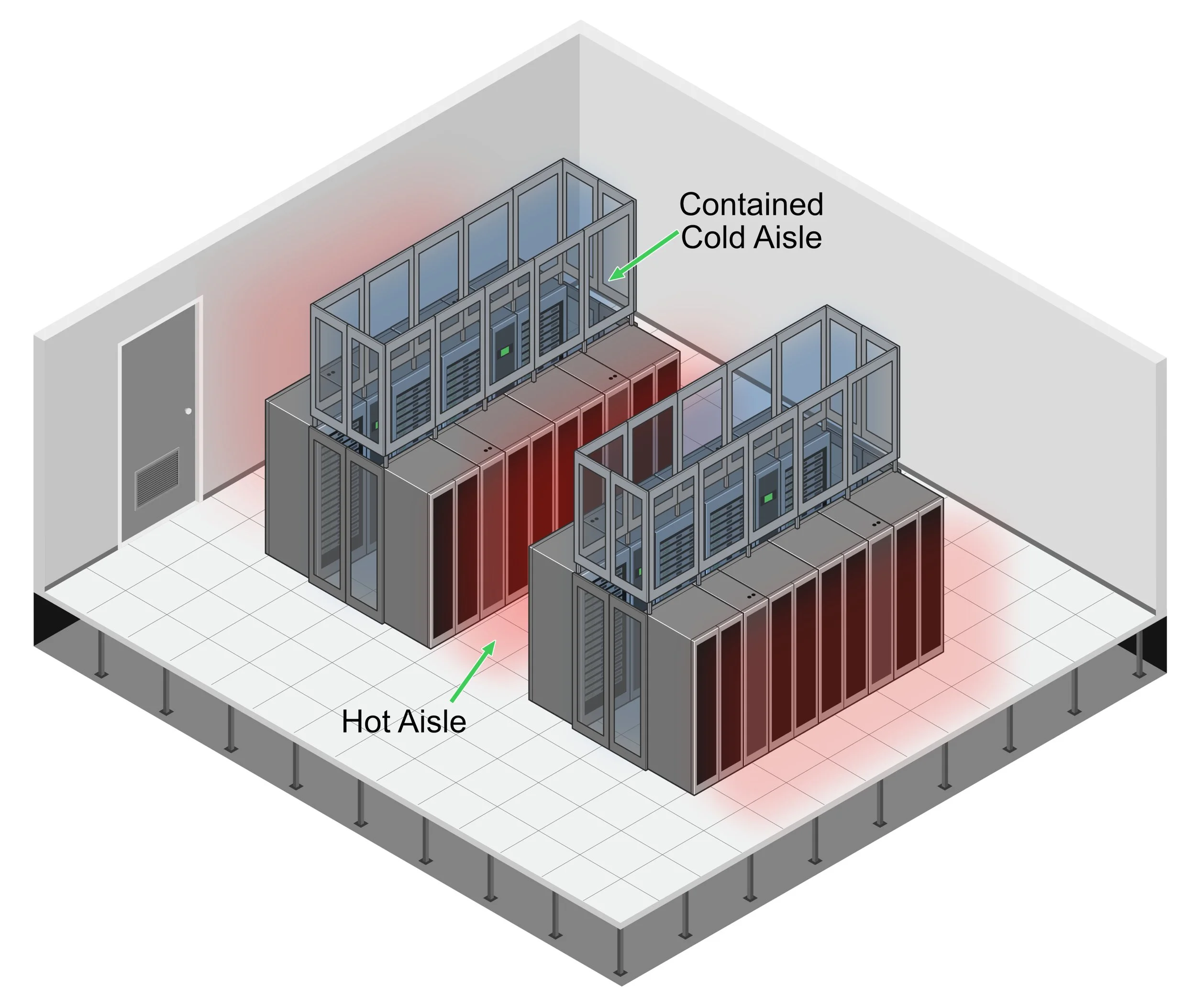
Cold aisle containment flips the script—instead of corralling the hot air, it protects the cold air supply by creating contained cold aisles where the fronts of servers face each other. The rest of the room becomes one significant hot air return, while your precious cold air stays exactly where needed.
Why CAC Shines:
-
Generally easier to retrofit into existing data centers (less "We need to rebuild everything!" drama)
-
Typically costs less to implement (your finance team will high-five you)
-
Works wonderfully with traditional raised floor cooling (no need to reinvent the wheel)
ASHRAE's Latest Plot Twist
The American Society of Heating, Refrigerating and Air-Conditioning Engineers (ASHRAE) Technical Committee 9.9 dropped their 5th Edition thermal guidelines in 2021, and they're as exciting as any season finale (at least to cooling nerds like me).
Key updates include:
-
A new equipment class (H1) for high-density computing with tighter temperature requirements: 18°C to 22°C (64.4°F to 71.6°F)
-
Revised humidity guidelines that depend on gaseous contamination levels
-
A recommendation to implement silver and copper "reactivity coupons" to monitor corrosion rates
It's like ASHRAE said, "Just when you thought you understood data center cooling, here's a whole new challenge!" But they're not wrong—as computing density increases and hardware advances, cooling requirements evolve in lockstep.
Rolling Up Your Sleeves: The Real-World Implementation
So you're convinced that letting hot and cold air duke it out in your data center isn't the best strategy. Smart move! I once walked into a client's server room where they had hung little paper pinwheels from the ceiling to "see where the air was going." Cute, but not exactly scientific.
Let's get our hands dirty with the real work:
Step 1: Become an Airflow Detective
Before ordering fancy containment hardware, you must understand what's happening in your data center. After enthusiastically installing containment in a small facility, I learned this lesson the hard way, only to discover we'd just efficiently contained the wrong airflow patterns. Oops.
Grab those thermal cameras (they make you feel like Predator hunting server heat signatures) and start mapping. Where are your hotspots hiding? Which racks are secretly operating their own sauna business? I've seen racks that looked fine on paper but recirculated hot air in patterns that would make a meteorologist dizzy.
The coolest part? Creating heat maps that look so dramatic, you could frame them as modern art. My favorite was a particularly chaotic facility where we nicknamed the thermal image "Dante's Inferno: The Server Edition." Your finance team might not appreciate the artistic value, but they'll understand the visualization of their cooling dollars disappearing into thin air.
Step 2: Design & Planning (Draw Your Battle Plans)
Choose your containment type based on your specific circumstances. Consider:
-
Heat density (HAC for the hot-rod servers, CAC for the more modest setups)
-
Existing infrastructure (working with what you've got)
-
Your budget (because even the coolest solutions need financial approval)
Run computational fluid dynamics (CFD) modeling to simulate airflow patterns. It's like having a crystal ball for air movement—you can predict problems before they happen.
Step 3: Installation (Build Your Fortress)
Time to get physical! Install your containment components:
-
Mount doors that would make a submarine captain proud (airtight is the goal)
-
Install roof systems that can handle fire suppression integration
-
Seal every gap like you're preparing for a thermal apocalypse
The goal is a system with less than 2% air leakage. Remember: leaks are your enemy in containment, as in space travel.
Step 4: Optimization (Fine-Tune Your Machine)
Once your containment system is running:
-
Implement 100% blanking panel coverage (those empty rack spaces are not just eyesores—they're efficiency killers)
-
Manage your cables like a perfectionist (airflow obstructions are cooling saboteurs)
-
Gradually increase cooling temperature set points to maximize efficiency while staying within ASHRAE guidelines.
The ROI Calculator: Measuring Your Win
Let's talk numbers, because eventually someone's going to ask if all this containment was worth it:
-
Implementation costs: $400-1,500 per rack position (depending on whether you go HAC or CAC and how fancy your materials are)
-
Energy savings: 20-40% of cooling costs (that's a lot of zeros over time)
-
Payback period: As short as 6-18 months for simpler solutions
Plus, more consistent temperatures extend equipment lifespan. It's like giving your servers a health spa treatment—they'll thank you with fewer failures and longer service.
Choosing Your Fighter: HAC vs. CAC Showdown
Still can't decide which containment system deserves your love? Here's a quick decision matrix that cuts through the confusion:

## The Future Is (Carefully) Blowing In The containment world isn't standing still. Emerging trends include:
-
Hybrid cooling approaches: Combining aisle containment with liquid cooling for those server racks that run hotter than the surface of Mercury
-
Modular, pre-engineered containment: Think LEGO sets for data centers—snap-together solutions for rapid deployment
-
Smart containment systems: AI-driven, dynamically adjustable containment that responds to changing cooling needs faster than you can say "temperature spike"
The Bottom Line
Proper aisle containment isn't just an efficiency play—it's becoming table stakes for any serious data center operation. As computing density increases and sustainability pressures mount, modern data centers must eliminate the free mingling of hot and cold air.
Whether you choose HAC or CAC depends on your specific circumstances, but the choice to implement some form of containment shouldn't be a question at all. Your servers, energy bill, and the planet will all thank you.
So go forth and contain! Your data center's thermal battlefield awaits its general, and those air streams won't separate themselves.
Ready to optimize your data center's airflow?
Don't let your servers continue their thermal tug-of-war. Our expert team designs and implements customized containment solutions that slash cooling costs while extending equipment life.
Get a containment consultation →
References
-
ASHRAE TC 9.9, "Thermal Guidelines for Data Processing Environments," 5th Edition, 2021. ASHRAE Datacom Encyclopedia
-
ANSI/TIA-942, "Telecommunications Infrastructure Standard for Data Centers." TechTarget Definition
-
Uptime Institute, "New ASHRAE Guidelines Challenge Efficiency Drive," 2021. Uptime Institute Blog
-
Energy Star, "Move to a Hot Aisle/Cold Aisle Layout." Energy Star
-
DataBank, "Optimizing Data Center Cooling: The Power Of Hot And Cold Aisle Containment," 2024. DataBank Blog
-
Upsite Technologies, "Hot Aisle Containment vs. Cold Aisle Containment: Benefits and Challenges," 2025. Upsite Blog
-
Subzero Engineering, "Hot Aisle Containment in Data Centers." Subzero Engineering
-
Subzero Engineering, "Cold Aisle Containment in Data Centers." Subzero Engineering
-
Data Centre Magazine, "Hot Aisle Containment – Keeping Data Centres Cool," 2022. Data Centre Magazine
-
AnD Cable Management, "Hot and Cold Aisle Containment in Data Centers," 2024. AnD Cable Blog
-
Upsite Technologies, "What You Need to Know About ASHRAE's Fifth Edition of Thermal Guidelines," 2021. Upsite Blog